


Review: Motorola VA76r Tundra
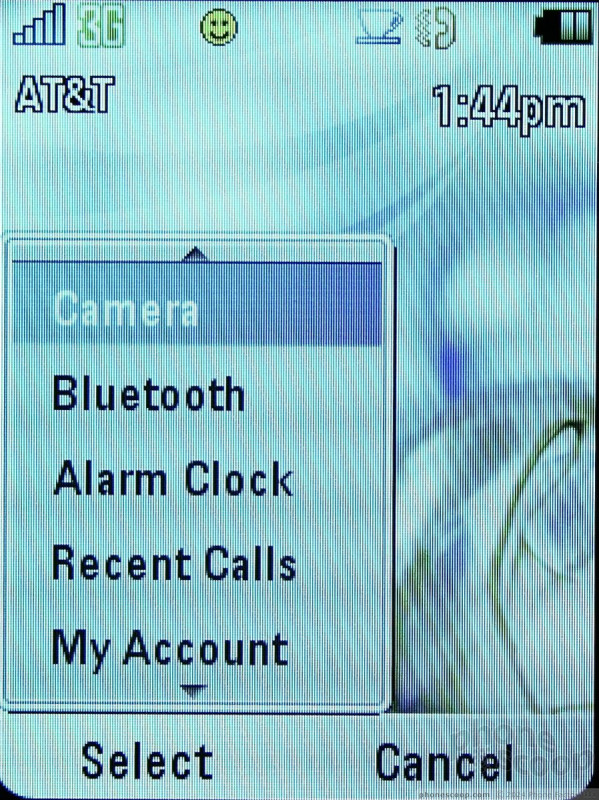
The Tundra's menu system doesn't differ all that much from that of other AT&T feature phones. From the home screen, the left soft key takes you to what AT&T calls a list of "options" that are really shortcuts to applications such as the camera, Bluetooth, the alarm clock and more. Calling it "options" - rather than "shortcuts", "favorites" or "apps" - is a misnomer.
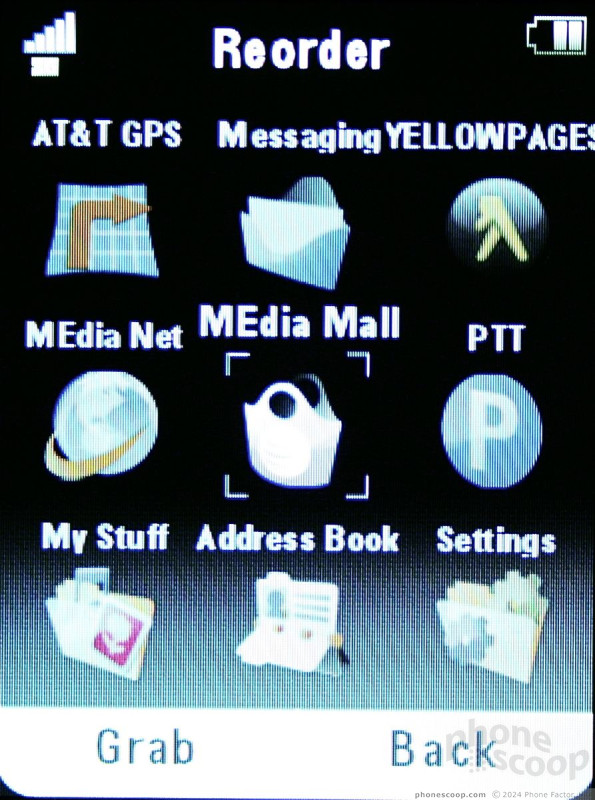
The main menu can be configured into a grid, list or spinner view. I found the grid to be the easiest to use. You can also re-order the layout of the grid, which is always nice. Beyond this main menu, most other menus are simple numbered lists.
For the home screen, the four directions of the D-pad can be set as shortcuts to specific applications.
Overall, the UI is pretty basic and the menus don't drill down too deep.




 CES 2009
 iPhone 15 Series Goes All-In on USB-C and Dynamic Island
 Samsung S24 Series Adds More AI, Updates the Hardware
 Motorola Refreshes razr Lineup with Better Batteries & More
 Kyocera Brings DuraForce Pro up to Date
 Motorola VA76r Tundra