

Review: Samsung T259
The T259 runs a proprietary feature phone operating system and its menu system is a cinch to master in no time at all.
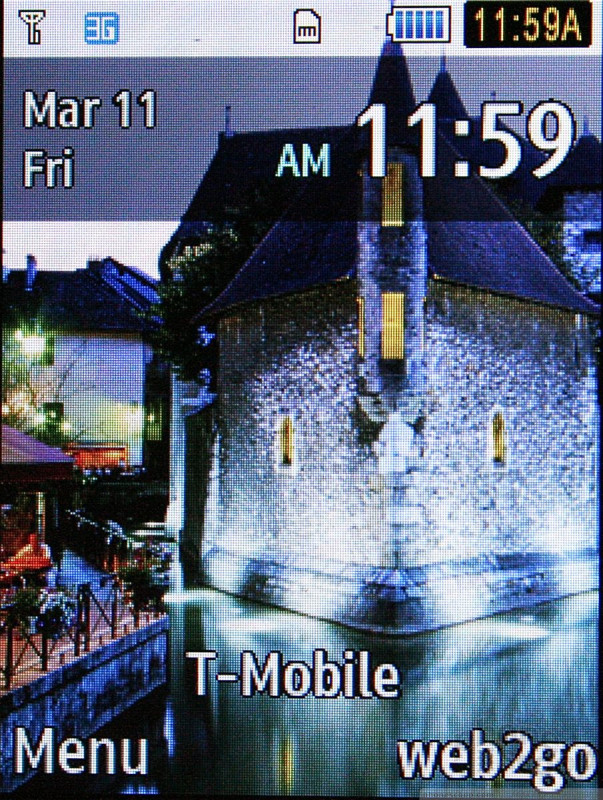
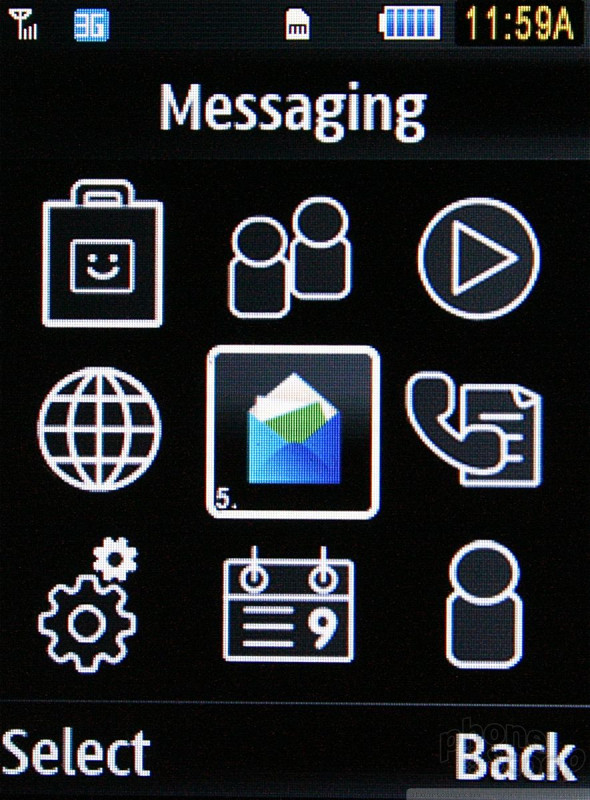
The home screen has two options that are accessible via the soft keys. To the left: Menu. To the right: Web. The main menu is a nine-icon grid that can't be altered or rearranged. The icons on this page are animated and will move around for you when you select them. Once you dig deeper than this screen, everything reverts to boring old text menus.
The menu options are lumped into categories that make sense, and I had no trouble at all finding everything I needed to adjust the T259's behavior.
As with most phones that have d-pads, users can activate app shortcuts by pressing on the directionals from the home screen. These can all be customized by the end user, as can the dedicated shortcut key and messaging key. The messaging key can only be customized to access different messaging features, however, and not other apps such as the media player.

 Motorola Refreshes razr Lineup with Better Batteries & More
 Samsung Stays The Course with its Entry-Level Model
 Consumer Cellular Launches Flip Phone with eSIM
 Total by Verizon Rebrands, Remixes Plans
 Google, TSA Testing New "ID Pass" in Wallet, Created by Scanning Passport
 Samsung SGH-T259